Every way to integrate seat maps
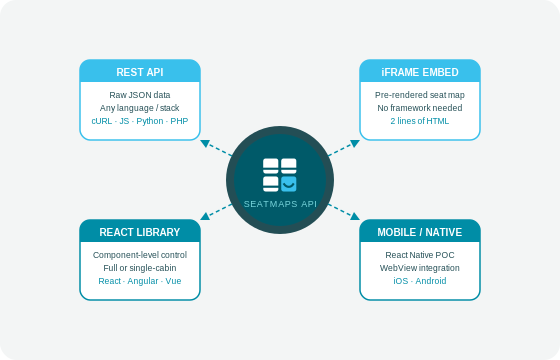
From raw JSON data to fully rendered React components and embeddable iFrames — pick the delivery format that fits your stack and timeline. Go live in under 4 weeks.
How it works
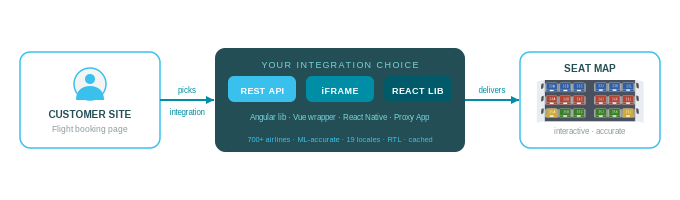
Your customer picks a flight. Your site calls our data. A beautiful, interactive seat map appears — however you choose to deliver it.
Contact Sales & get credentials
Reach out to our team. We set up your API key and grant access to the sandbox environment — usually within a business day.
Choose your delivery format
REST API for raw JSON, iFrame for a two-line embed, native React and Angular libraries for component-level control, or wrappers for Vue and React Native.
Go live with ML-accurate maps
Our machine-learning engine keeps seat maps accurate even when schedules change. Cache data as needed. Ship with confidence.
Who builds with SeatMaps?
Flight booking flows
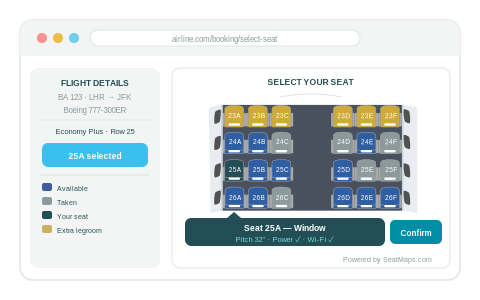
OTAs and airline.com direct — embed interactive seat selection right inside your booking flow. Drive ancillary revenue and reduce post-booking calls.
Ancillary upsell
Show cabin context visually to convert more passengers to premium seats. Pitch 32", Width 17.5", Power socket, Wi-Fi — displayed before they decide.
Travel apps & aggregators
Enrich flight search results with cabin class data, legroom scores, CO2 estimates, baggage allowances, and in-flight entertainment availability.
Ready to integrate?
Integration options
Pick the approach that matches your stack. Each option includes step-by-step guidance and working code samples.
REST API — raw data, any stack
Use when you build your own seat map UI or need to consume raw JSON seat data in any backend language.
Our API returns structured seat data with positions, classes, amenities, availability, and pricing — you render it your way.
# flights.json
# {
#   "flights": [{
#     "id":             "some-uniq-flight-id-here",
#     "departure":      "MUC",
#     "arrival":        "DXB",
#     "airlineCode":    "EK",
#     "flightNo":       "52",
#     "departureDate":  "2026-12-28",
#     "cabinClass":     "E"
#   }],
#   "featuresList": ["plane","cabin","wifi","seatMapLink","media"],
#   "lang":  "RU",
#   "units": "metric"
# }

curl -X POST \
  --data @flights.json \
  --header "Content-Type: application/json" \
  --header "authorization: Bearer $JWT_TOKEN_HERE" \
  https://sandbox.quicket.io/api/v1/flight/features/plane

# Response — array, each item matched by "id":
# [
#   {
#     "id": "some-uniq-flight-id-here",
#     "plane":      { "summary": "Airbus A380-800", "model": "388", ... },
#     "cabin":      { "pitch": "81-86 cm", "width": "45 cm", ... },
#     "wifi":       { "exists": true, "cost": "free", ... },
#     "seatmapLink":"https://sandbox.quicket.io/api/v1/plane/seatmap/.../redirect",
#     "media":      { "photoData": [...], "panoData": [...] }
#   }
# ]const response = await fetch(
'https://sandbox.quicket.io/api/v1/flight/features/plane',
{
method: 'POST',
headers: {
'Content-Type': 'application/json',
'authorization': `Bearer ${JWT_TOKEN_HERE}`,
},
body: JSON.stringify({
flights: [{
id: 'some-uniq-flight-id-here',
departure: 'MUC',
arrival: 'DXB',
airlineCode: 'EK',
flightNo: '52',
departureDate: '2026-12-28',
cabinClass: 'E',
}],
featuresList: ['plane', 'cabin', 'wifi', 'seatMapLink', 'media'],
lang: 'RU',
units: 'metric',
}),
}
);
// Response is an array matched by id
const results = await response.json();
const flight = results.find(f => f.id === 'some-uniq-flight-id-here');
flight.plane.summary; // "Airbus A380-800"
flight.cabin.pitch; // "81-86 cm"
flight.wifi.exists; // true
flight.wifi.cost; // "free"
flight.seatmapLink; // URL → embed as iframe.src
flight.media.photoData[0].file; // cabin photo URL
flight.media.panoData[0].file; // 360° panorama URLimport requests
response = requests.post(
'https://sandbox.quicket.io/api/v1/flight/features/plane',
headers={
'Content-Type': 'application/json',
'authorization': f'Bearer {JWT_TOKEN_HERE}',
},
json={
'flights': [{
'id': 'some-uniq-flight-id-here',
'departure': 'MUC',
'arrival': 'DXB',
'airlineCode': 'EK',
'flightNo': '52',
'departureDate': '2026-12-28',
'cabinClass': 'E',
}],
'featuresList': ['plane', 'cabin', 'wifi', 'seatMapLink', 'media'],
'lang': 'RU',
'units': 'metric',
},
)
# Response is a list matched by id
results = response.json()
flight = next(f for f in results if f['id'] == 'some-uniq-flight-id-here')
flight['plane']['summary'] # "Airbus A380-800"
flight['cabin']['pitch'] # "81-86 cm"
flight['wifi']['exists'] # True
flight['wifi']['cost'] # "free"
flight['seatmapLink'] # URL → embed as iframe.src
flight['media']['photoData'][0]['file'] # cabin photo URL
flight['media']['panoData'][0]['file'] # 360° panorama URL$ch = curl_init('https://sandbox.quicket.io/api/v1/flight/features/plane');
curl_setopt_array($ch, [
CURLOPT_HTTPHEADER => [
'Content-Type: application/json',
'authorization: Bearer ' . $JWT_TOKEN_HERE,
],
CURLOPT_POST => true,
CURLOPT_POSTFIELDS => json_encode([
'flights' => [[
'id' => 'some-uniq-flight-id-here',
'departure' => 'MUC',
'arrival' => 'DXB',
'airlineCode' => 'EK',
'flightNo' => '52',
'departureDate' => '2026-12-28',
'cabinClass' => 'E',
]],
'featuresList' => ['plane', 'cabin', 'wifi', 'seatMapLink', 'media'],
'lang' => 'RU',
'units' => 'metric',
]),
CURLOPT_RETURNTRANSFER => true,
]);
// Response is an array matched by id
$results = json_decode(curl_exec($ch), true);
$flight = current(array_filter($results,
fn($f) => $f['id'] === 'some-uniq-flight-id-here'
));
$flight['plane']['summary']; // "Airbus A380-800"
$flight['cabin']['pitch']; // "81-86 cm"
$flight['wifi']['exists']; // true
$flight['wifi']['cost']; // "free"
$flight['seatmapLink']; // URL → embed as iframe.src
$flight['media']['photoData'][0]['file']; // cabin photo URL
$flight['media']['panoData'][0]['file']; // 360° panorama URL
iFrame — the simplest embed
No React, no JavaScript framework. SeatMaps pre-renders the entire aircraft as a static HTML page.
Your backend fetches the seat map URL from our API; your frontend embeds it in a single<iframe> tag. Done.
Passengers can click seats and your page receives events viapostMessage.
# flights.json
# {
#   "flights": [{
#     "id":             "some-uniq-flight-id-here",
#     "departure":      "MUC",
#     "arrival":        "DXB",
#     "airlineCode":    "EK",
#     "flightNo":       "52",
#     "departureDate":  "2026-12-28",
#     "cabinClass":     "E"
#   }],
#   "featuresList": ["seatMapLink"],
#   "lang":  "EN",
#   "units": "metric"
# }

curl -X POST \
  --data @flights.json \
  --header "Content-Type: application/json" \
  --header "authorization: Bearer $JWT_TOKEN_HERE" \
  https://sandbox.quicket.io/api/v1/flight/features/plane

# Response — array, each item matched by "id":
# [
#   {
#     "id": "some-uniq-flight-id-here",
#     "seatmapLink": "https://sandbox.quicket.io/api/v1/plane/seatmap/.../redirect"
#   }
# ]

# Step 2: pass seatmapLink to your frontend as the iframe src.<!-- Embed the pre-rendered seat map (URL from your backend) -->
<iframe
id="seatmap-frame"
src="https://static.quicket.io/aircrafts/ba123-a1b2c3.htm"
width="100%"
height="600"
frameborder="0"
allow="fullscreen"
></iframe>
<!-- Listen for seat selection events -->
<script>
window.addEventListener('message', (event) => {
if (event.data.type === 'SEAT_SELECTED') {
const { seatNumber, cabin, price } = event.data;
console.log('Selected:', seatNumber, cabin, price);
// proceed with your booking flow
}
});
</script>
React Library — full control
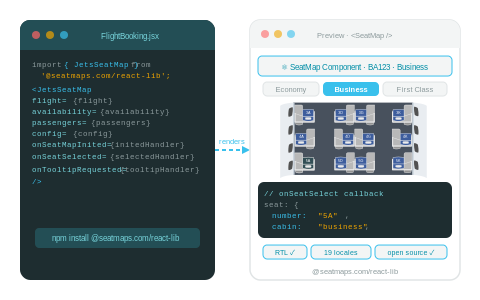
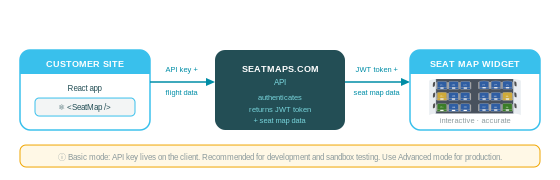
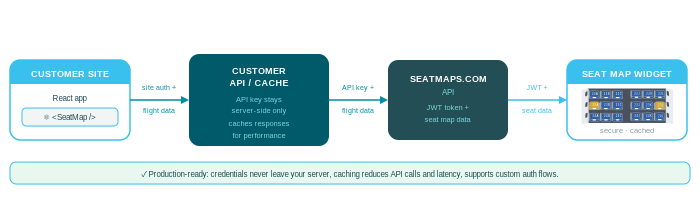
Use when you have a React app and need component-level control: custom themes, single-cabin rendering, custom tooltips, passenger flows, and open-source access.
Available in two integration modes — choose based on your security requirements.
// npm install @seatmaps.com/react-lib
import { JetsSeatMap } from '@seatmaps.com/react-lib';

const flight = {
  id:            '1111',
  airlineCode:   'BA',
  flightNo:      '106',
  departureDate: '2023-09-28',
  departure:     'DXB',
  arrival:       'LHR',
  cabinClass:    'E', // E=economy P=premium B=business F=first A=whole plane
};

const config = {
  width:    400,
  lang:     'EN',
  units:    'metric',
  apiUrl:   'PROVIDED_URL',
  apiAppId: 'PROVIDED_APP_ID',
  apiKey:   'PROVIDED_KEY',
};

// Optional: mark which seats are available and their prices
const availability = [
  { label: '*',   price: 0,  currency: 'EUR' }, // default for all seats
  { label: '1A',  price: 49, currency: 'EUR' },
];

// Optional: one object per passenger to allocate
const passengers = [
  { id: 'p1', passengerLabel: 'John' },
  { id: 'p2', passengerLabel: 'Jane' },
];

function ShowSeatmap() {
  return (
    <JetsSeatMap
      flight={flight}
      config={config}
      availability={availability}
      passengers={passengers}
      onSeatMapInited={() => console.log('seat map ready')}
      onSeatSelected={(seat) => console.log('selected', seat)}
      onSeatUnselected={(seat) => console.log('unselected', seat)}
      onLayoutUpdated={(layout) => console.log('layout', layout)}
    />
  );
}// npm install @seatmaps.com/react-lib
import { JetsSeatMap, IFlight, IConfig, IIncomingSeat, IPassenger } from '@seatmaps.com/react-lib';
const flight: IFlight = {
id: '1111',
airlineCode: 'BA',
flightNo: '106',
departureDate: '2023-09-28',
departure: 'DXB',
arrival: 'LHR',
cabinClass: 'E', // E=economy P=premium B=business F=first A=whole plane
};
const config: IConfig = {
width: 400,
lang: 'EN',
units: 'metric',
apiUrl: 'PROVIDED_URL',
apiAppId: 'PROVIDED_APP_ID',
apiKey: 'PROVIDED_KEY',
};
// Optional: mark which seats are available and their prices
const availability: IIncomingSeat[] = [
{ label: '*', price: 0, currency: 'EUR' }, // default for all seats
{ label: '1A', price: 49, currency: 'EUR' },
];
// Optional: one object per passenger to allocate
const passengers: IPassenger[] = [
{ id: 'p1', passengerLabel: 'John' },
{ id: 'p2', passengerLabel: 'Jane' },
];
function ShowSeatmap(): JSX.Element {
return (
<JetsSeatMap
flight={flight}
config={config}
availability={availability}
passengers={passengers}
onSeatMapInited={() => console.log('seat map ready')}
onSeatSelected={(seat) => console.log('selected', seat)}
onSeatUnselected={(seat) => console.log('unselected', seat)}
onLayoutUpdated={(layout) => console.log('layout', layout)}
/>
);
}
Angular Library — native, no iFrame
Use when you have an Angular app and want the same component-level control the React library gives: custom themes, single-cabin rendering, custom tooltips, passenger flows, and open-source access.
A standalone<sm-jets-seat-map> component — no iFrame and nopostMessage. Input names and payload shapes match@seatmaps.com/react-lib, so React experience carries over directly. Requires Angular 21+.
Inputs:flight,config,availability,passengers,currentDeckIndex,seatJumpTo. Outputs mirror the React callbacks —seatMapInited,seatSelected,seatUnselected,layoutUpdated,tooltipRequested — plus Angular-only additions such asdeckChanged,loadError.
The seat, tooltip and loading components can each be swapped for your own viaconfig.componentOverrides. Apache-2.0 licensed.
// npm install @seatmaps.com/angular-lib

// seatmap.component.ts
import { Component } from '@angular/core';
import {
  JetsSeatMapComponent,
  IFlight,
  IConfig,
  TSeatAvailability,
  IPassenger,
  IInitialLayoutData,
  ILayoutData,
} from '@seatmaps.com/angular-lib';

@Component({
  selector: 'app-seatmap',
  standalone: true,
  imports: [JetsSeatMapComponent], // JetsSeatMapModule is exported too
  templateUrl: './seatmap.component.html',
})
export class SeatmapComponent {
  flight: IFlight = {
    id:            '1111',
    airlineCode:   'BA',
    flightNo:      '106',
    departureDate: '2023-09-28',
    departure:     'DXB',
    arrival:       'LHR',
    cabinClass:    'E', // E=economy P=premium B=business F=first A=whole plane
  };

  config: IConfig = {
    width:    400,
    lang:     'EN',
    units:    'metric',
    apiUrl:   'PROVIDED_URL',
    apiAppId: 'PROVIDED_APP_ID',
    apiKey:   'PROVIDED_KEY', // or a () => string for lazily resolved keys
  };

  // Optional: mark which seats are available and their prices
  availability: TSeatAvailability = [
    { label: '*',  price: 0,  currency: 'EUR' }, // default for all seats
    { label: '1A', price: 49, currency: 'EUR' },
  ];

  // Optional: one object per passenger to allocate
  passengers: IPassenger[] = [
    { id: 'p1', passengerLabel: 'John' },
    { id: 'p2', passengerLabel: 'Jane' },
  ];

  deckIndex = 0;

  onSeatMapInited(data: IInitialLayoutData) { console.log('seat map ready', data); }
  onSeatSelected(passengers: IPassenger[]) { console.log('selected', passengers); }
  onSeatUnselected(passengers: IPassenger[]) { console.log('unselected', passengers); }
  onLayoutUpdated(layout: ILayoutData) { console.log('layout', layout); }
}<!-- seatmap.component.html -->
<sm-jets-seat-map
[flight]="flight"
[config]="config"
[availability]="availability"
[passengers]="passengers"
[currentDeckIndex]="deckIndex"
(seatMapInited)="onSeatMapInited($event)"
(seatSelected)="onSeatSelected($event)"
(seatUnselected)="onSeatUnselected($event)"
(layoutUpdated)="onLayoutUpdated($event)"
/>
Framework Wrappers — Vue & vanilla JS
Use when you need full React library features but your project is built with Vue or vanilla JS. Angular has its own native library — see the Angular Library tab.
React Proxy App — an iFrame containing a React app. Your page communicates viapostMessage, so the integration works with any tech stack.
Incoming messages: flight data, availability, passengers, config, currentDeckIndex.
Outgoing events:onSeatMapInited,onSeatSelected,onSeatUnselected,onLayoutUpdated,onTooltipRequested.
  <iframe
    id="seatmap-proxy"
    src="https://seatmap.quicket.io/react-app-proxy"
    width="100%"
    height="600"
    frameborder="0"
  ></iframe>

  <script>
  const frame = document.getElementById('seatmap-proxy');

  // Step 2: initialise after the iframe loads
  frame.addEventListener('load', () => {
    // INIT SEAT MAP
    frame.contentWindow.postMessage({
      type: 'INIT_SEAT_MAP',
      payload: {
        apiKey:     'YOUR_API_KEY',
        flight:     'BA123',
        date:       '2025-06-15',
        locale:     'en',
        passengers: [{ id: 'p1', name: 'John Doe' }],
      },
    }, '*');
  });

  // Step 3: listen for events
  window.addEventListener('message', ({ data }) => {
    switch (data.type) {
      case 'onSeatMapInited':
        console.log('Seat map ready'); break;
      case 'onSeatSelected':
        console.log('Seat selected:', data.seat); break;
      case 'onSeatUnselected':
        console.log('Seat unselected'); break;
      case 'onLayoutUpdated':
        console.log('Layout updated'); break;
      case 'onTooltipRequested':
        console.log('Custom tooltip:', data.seat); break;
    }
  });

  // Other available operations:
  // SET_AVAILABILITY  — update available seats
  // SET_PASSENGERS    — update passenger list
  // SET_DECK          — switch between decks
</script><!-- npm i @seatmaps.com/react-lib-vue-wrapper -->
<template>
<div id="app">
<JetsSeatmap
:flight="flight"
:config="config"
:availability="availability"
:passengers="passengers"
:seatJumpTo="seatJumpTo"
:currentDeckIndex="currentDeckIndex"
@onSeatMapInited="onSeatMapInited($event)"
@onSeatSelected="onSeatSelected($event)"
@onSeatUnselected="onSeatUnselected($event)"
@onTooltipRequested="onTooltipRequested($event)"
@onLayoutUpdated="onLayoutUpdated($event)"
@onSeatMouseLeave="onSeatMouseLeave($event)"
@onSeatMouseClick="onSeatMouseClick($event)"
@onAvailabilityApplied="onAvailabilityApplied($event)"
></JetsSeatmap>
</div>
</template>
<script setup>
import { createApp } from 'vue';
import App from './App.vue';
import JetsSeatmap from 'jets-seatmap-vue-wrapper';
const app = createApp(App);
// difference in "use" between 2.x and 3.x
app.use(JetsSeatmap);
app.mount('#app');
</script>
React Native — mobile apps
Use when you build an iOS or Android app with React Native and need an interactive seat map inside aWebView.
Note: this is a POC (proof of concept) integration. Contact our sales team to discuss production readiness and your specific requirements.
// npm install jets-seatmap-react-native-lib

import React from 'react';
import {SafeAreaView} from 'react-native';
import {JetsSeatMap} from 'jets-seatmap-react-native-lib';

const DemoScreen = ({route, navigation}) => {
  const {config, flight, availability, passengers} = route.params;

  return (
    <SafeAreaView
      children={<JetsSeatMap flight={flight} availability={availability} passengers={passengers} config={config} />}
    />
  );
};
iFrame vs React Library
Both options cover 700+ airlines, 19 locales, RTL, ML-accuracy, and seat availability with prices. Choose based on how much control you need.
| Feature | iFrame (Vector) | React Library |
|---|---|---|
| 1.Render scope | Entire plane only | Entire plane or single cabin |
| 2.Integration method | iframe only | React / Angular / Vue / iframe |
| 3.Color themes | Predefined only | Fully customizable |
| 4.Localization | Predefined only | Predefined only |
| 5.Communication | postMessage | Native props / postMessage |
| 6.Detailed plane body | ✓ | — |
| 7.RTL support | ✓ | ✓ |
| 8.Horizontal layout | — | ✓ |
| 9.Seat availability + prices | ✓ | ✓ |
| 10.Additional seat features | ✓ | ✓ |
| 11.Tooltip on hover | ✓ | ✓ |
| 12.Custom tooltip | — | ✓ |
| 13.Custom passenger flow | — | ✓ |
| 14.Custom security layer | — | ✓ |
| 15.Read-only passengers | — | ✓ |
| 16.Hide seat properties | — | ✓ |
| 17.Custom seat colors (score) | — | ✓ |
| 18.Cabin titles | — | ✓ |
| 19.Open source | — | ✓ |
| 20.Two decks simultaneously | — | ✓ |
Demo & Resources
Everything you need to evaluate, prototype, and build — before you sign anything.